Japanese Input Method for macOS
Type Japanese in romaji, press Space, and get the whole sentence in kanji. A 3.3-million-word dictionary is built in, your choices are remembered, and everything stays on your Mac.
Install guide Keyboard reference All releases & SHA-256 License
A focused input method. No account, no cloud, no setup beyond adding it as an input source.
The Mozc open source dictionary plus the Mozc UT dictionaries: Wikipedia titles, people and place names, new words and set phrases, all included in the installer.
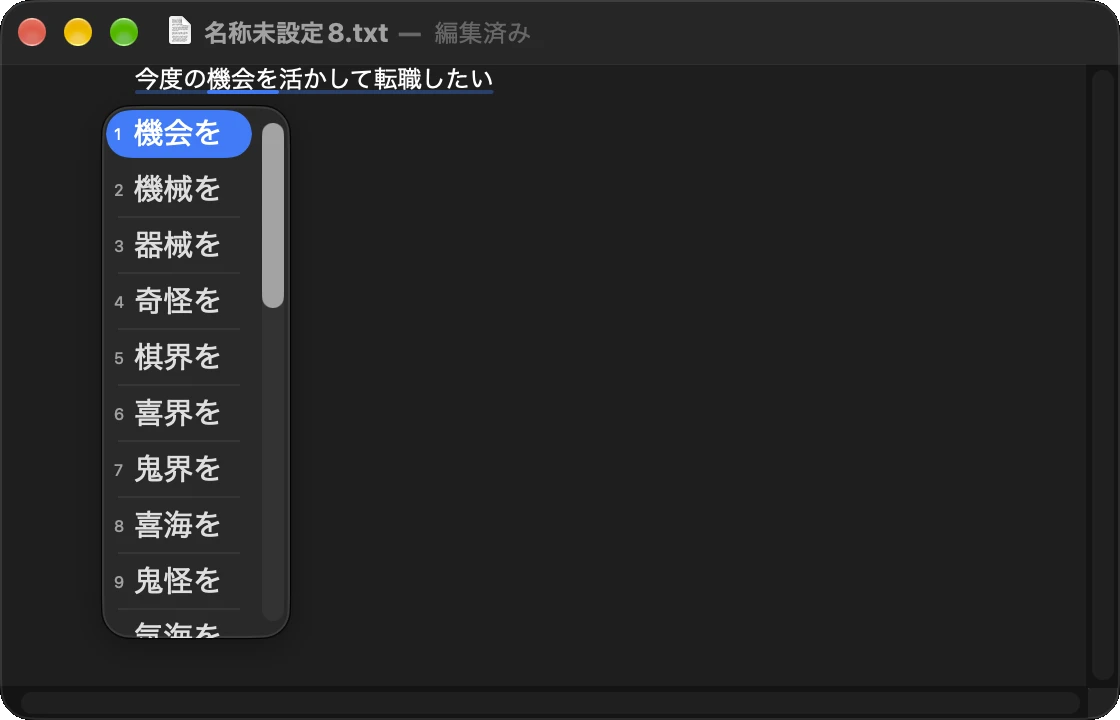
Type a full sentence and press Space once. Kodama IME splits it into phrases and picks each word from its context. Stretch or shrink a phrase with Shift+← / →.
The word you pick comes first next time, and a phrase boundary you fix stays fixed. Your latest choice always wins, and one key forgets a choice you made by mistake.
Type the Japanese reading of an emoji, arrow or bracket and pick it from the candidates, after the kanji so that everyday conversion stays uncluttered.
Words that cannot become kana, and words typed with Shift, are offered exactly as typed, so product names and acronyms need no mode switch.
Conversion, dictionaries and learning all run on your Mac. Kodama IME never connects to the network: no account, no telemetry, nothing you type leaves the machine.
| Key | While typing | While converting |
|---|---|---|
| Letters | Romaji becomes kana at the cursor | Commit the current candidate and start a new input |
| Shift+letter | Keep the following letters as typed, until you commit or cancel | Commit and start a new input |
| Space | Convert the whole input into phrases | Next candidate for the selected phrase |
| ↓ / ↑ | - | Next / previous candidate |
| ← / → | Move the cursor in the input | Select the previous / next phrase |
| Shift+← / → | Move the cursor in the input | Shrink / stretch the selected phrase by one character |
| Return | Commit as kana | Commit all phrases |
| Shift+Delete | - | Forget what was learned for the selected phrase and convert it again |
| Delete | Delete the character before the cursor | Back to the input |
| Esc | Cancel the input | Back to the input |
| Shift+Space | Full-width space | - |
The Eisu key switches to ABC and the Kana key back to Japanese; the input menu does the same. Numbers and symbols on the main keyboard are entered full-width, and the numeric keypad stays half-width.
Add your own words with the user dictionary editor, opened from the Kodama IME section of the input menu. Words you add come before every built-in word.
Kodama IME is signed with a Kodama & Co. Developer ID and notarized by Apple. To update, install the new version over the old one; the input sources stay in place.
Remove Kodama IME from Input Sources, then delete /Library/Input Methods/Kodama IME.app. To remove your learning and user dictionary as well, delete ~/Library/Application Support/Kodama IME.
Kodama IME ships with the following dictionaries. Each keeps its own license; the full texts are inside the app, and "About Kodama IME" in the input menu lists them.
| Dictionary | License |
|---|---|
| Mozc open source dictionary (with IPAdic and the Okinawa dictionary) | BSD 3-Clause and others |
| Place names (Japan Post postal code data) | Public domain |
| Personal names | Apache License 2.0 |
| SudachiDict (Works Applications) | Apache License 2.0 |
| mecab-ipadic-NEologd | Apache License 2.0 |
| Japanese Wikipedia article titles | CC BY-SA |
| EDICT2 (Electronic Dictionary Research and Development Group) | CC BY-SA 4.0 |
| SKK dictionary | GPL 2.0 or later |
| alt-cannadic | GPL 2.0 |
The Mozc UT dictionaries are compiled by UTUMI Hirosi.
| Version | Released | Download |
|---|---|---|
| 1.1.0 | Oct 6, 2026 | Kodama-IME-1.1.0.pkg (44.1 MB)SHA-256 fa8f0a68de4e5fbf4e0466bdad59934635ffd472c7326386b5db8f081e286b24 |
Verify a download in Terminal:
shasum -a 256 ~/Downloads/Kodama-IME-1.1.0.pkg
Free for macOS 14 Sonoma or later. Questions or bug reports? Contact us.
Download Kodama IME 1.1.0